Hand Gestures for Creative Design
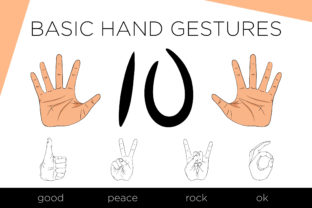
Hand Gestures is a versatile collection of 36 isolated elements featuring color and black-and-white hands, all in transparent formats. This set also includes 10 great patterns, making it an invaluable resource for designers, artists, and creators looking to add visual interest and depth to their projects. Whether you're working on digital art, branding, or educational materials, this archive offers a wide range of options that can be easily integrated into your workflow.
What Makes Hand Gestures Stand Out?
At its core, Hand Gestures is designed with simplicity and flexibility in mind. Each hand element is carefully crafted to be isolated, allowing for easy customization and use in various contexts. The inclusion of both color and black-and-white versions gives users the freedom to match their design needs precisely. Transparency is another key feature, making these elements ideal for layering over backgrounds or combining with other graphics without losing clarity.
Why Choose Hand Gestures?
For professionals and hobbyists alike, Hand Gestures provides a practical solution for enhancing visual content. Its versatility makes it suitable for a wide array of applications, from creating engaging social media posts to developing instructional materials. The availability of multiple file formats—EPS10, JPEG, and PNG—ensures compatibility with a variety of software and platforms, whether you're working on a computer or mobile device.
Practical Uses of Hand Gestures
One of the most common uses of Hand Gestures is in digital design projects. For instance, a blogger might incorporate a hand gesture to illustrate a point in a tutorial or infographic. Similarly, educators can use these elements to make learning more interactive and visually appealing. In the world of marketing, brands can leverage hand gestures to create eye-catching logos, social media graphics, or even product packaging.
Freelancers and small business owners may find Hand Gestures particularly useful when designing websites or promotional materials. These elements can be used to convey messages more effectively, adding a human touch to otherwise static visuals. Additionally, the transparent nature of the files allows for seamless integration into video content, such as explainer videos or animated presentations.
Realistic Use Cases
- Graphic Design: Incorporate hand gestures into logos, posters, or banners to make designs more relatable and dynamic.
- Education: Use isolated hands in teaching materials to demonstrate concepts like counting, anatomy, or motion.
- Marketing: Add hand gestures to social media posts or email campaigns to engage audiences and convey emotions.
- Web Development: Integrate these elements into website layouts to enhance user experience and visual appeal.
- Video Production: Use hand gestures in animations or video editing to add storytelling elements.
Important Considerations Before Using Hand Gestures
Before diving into using Hand Gestures, there are a few important factors to keep in mind. First, ensure that the file formats you choose align with your project requirements. For example, EPS10 is ideal for vector-based work, while JPEG and PNG are better suited for web and print use. It's also crucial to understand the licensing terms associated with the archive, especially if you plan to use the elements commercially.
Another consideration is the resolution and quality of the images. High-resolution files will ensure that your final output looks sharp and professional, regardless of where the elements are used. Additionally, consider how the hand gestures fit within your overall design theme. They should complement rather than overwhelm the visual composition.
Getting Started with Hand Gestures
If you're new to using hand gestures in your creative projects, start by exploring the different elements available. Experiment with placing them in various contexts to see how they enhance your work. Don't hesitate to combine multiple gestures or patterns to create unique compositions. As you become more comfortable, you'll discover new ways to integrate these elements into your workflow.
Remember, the goal is to use Hand Gestures to support your message or design vision, not to overshadow it. With practice and experimentation, you'll soon find that these elements can significantly elevate the impact of your creative projects.